
Game update
Maps next to you load faster
Changes
- When you stand still on a map for a few seconds, the game quietly saves the maps its warps lead to, so walking into one of them loads faster. It stops when you change maps or switch to another tab, and it does not run on a slow or data-saver connection.
After a map has loaded and you have stood still for 5 seconds, your browser saves the files of the maps its warps lead to, up to 30 MB at a time. In our tests, walking from Izlude into Prontera Field 08 then downloaded 0 game files instead of 93.
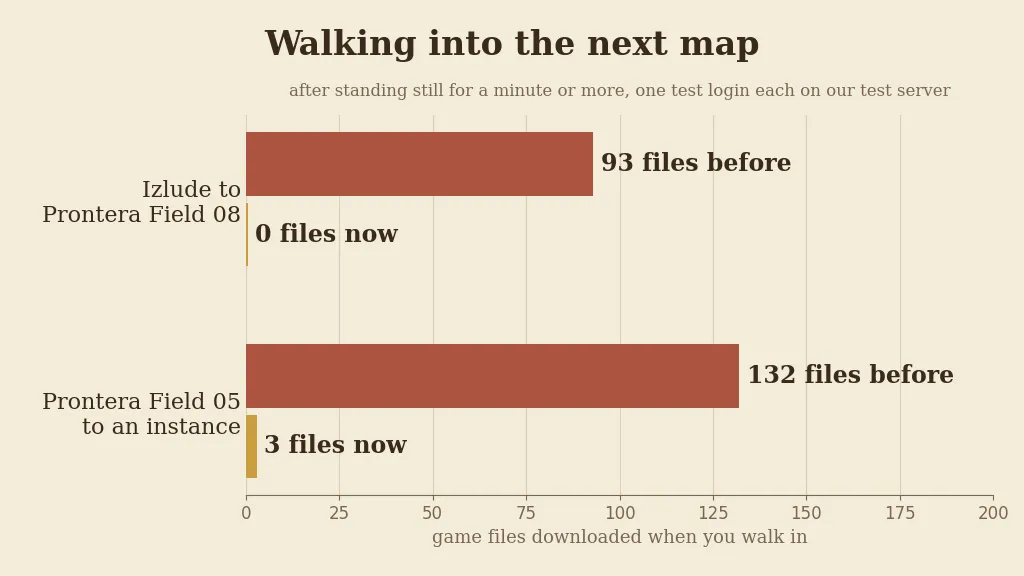
Game files downloaded on walking into the next map after standing still, one test login each on our test server. - If your disk is full, loading a map no longer runs into an error. The game stops saving files for that visit and loads them from the internet instead.
Before, a nearly full disk could make the game page run into an error while a map loaded. In our tests it happened in 2 of 6 loads before and in 0 of 6 now; every load reached the map.
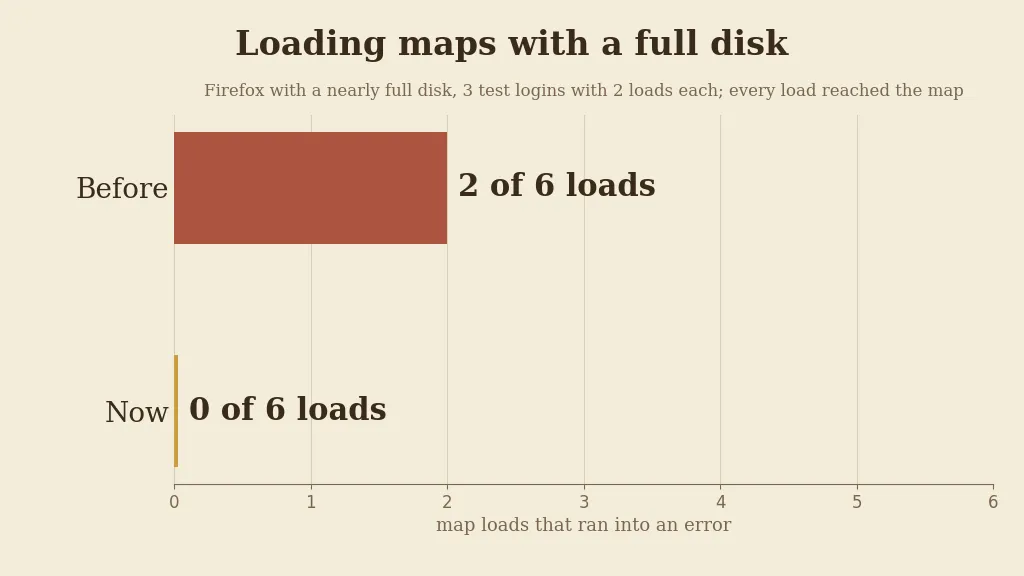
Map loads in Firefox with a nearly full disk, 3 test logins with 2 loads each. - Press Ctrl+F5 on the game page (Mac: Cmd+Shift+R) to get the update. Logging out and back in is not enough.
The update is in the game files, so the page has to load them again.

The game page after Ctrl+F5.