Game update
Coin icons in shops, Party window on Alt+X
Changes
- Shops: shops that sell for coins or tokens now show that coin or token next to each price instead of "Z".
At the Refine Supplier, the Festival Merchant and other shops that take coins or tokens, the price column now shows the coin or token you pay with, so you can tell at a glance what each item costs. The prices did not change; only the 'Z' (zeny) mark next to them was wrong.
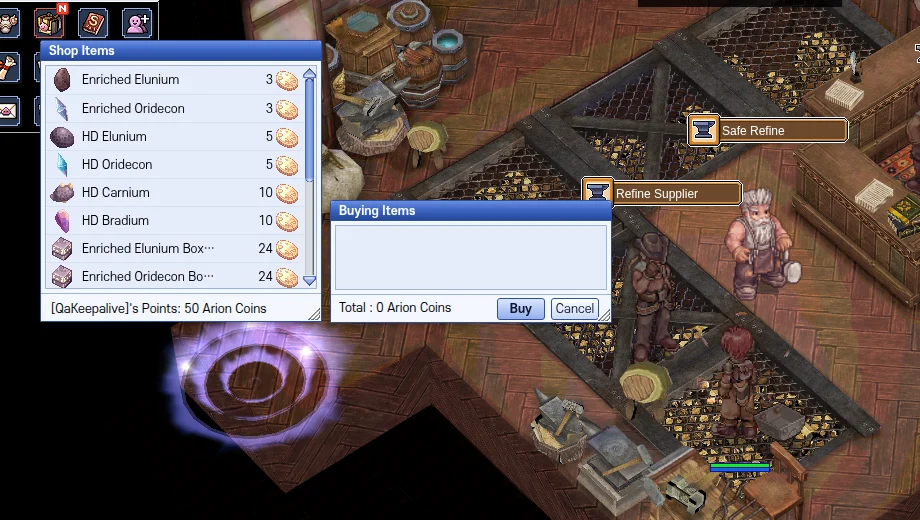
Refine Supplier: every price shows the Arion Coin it costs - The Party window shortcut is now Alt+X (the NVIDIA overlay takes Alt+Z). If you set your own key in Esc > Hotkey, it stays.
Alt+X opens and closes the Party window. On PCs with the NVIDIA overlay, Alt+Z opened the overlay instead. Keys you set yourself in Esc > Hotkey are kept.
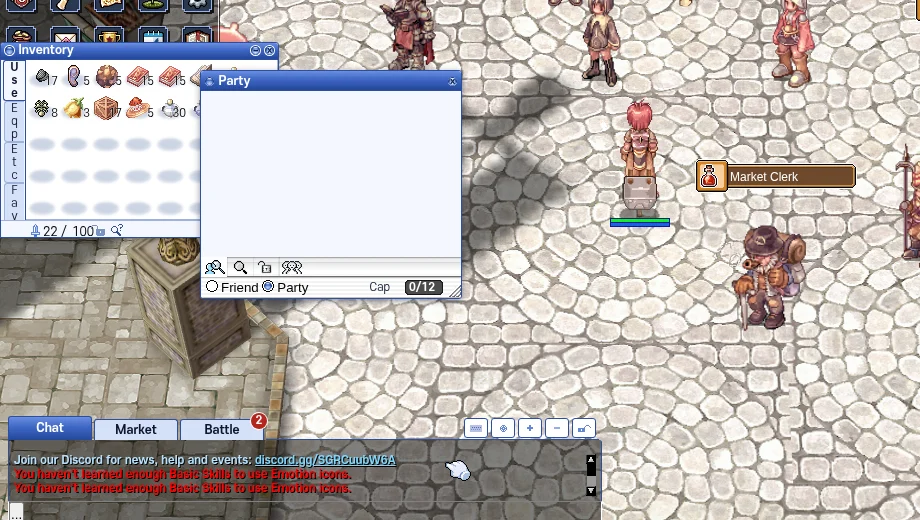
Alt+X: the Party window - Press Ctrl+F5 on the game page (Mac: Cmd+Shift+R) to get the update. Logging out and back in is not enough.
The game page keeps the client it loaded when you opened it. Ctrl+F5 loads the page fresh, with the coin icons and the new Party key.
After Ctrl+F5: coin icons in the shop windows