
Game update
Whispers open in a light window above the chat log
How to get it
- Press Ctrl+F5 on the game page (Mac: Cmd+Shift+R) to get the update. Logging out and back in is not enough.
The game page keeps the client it loaded when you opened it. Ctrl+F5 loads the page fresh, with the new whisper window. Logging out and back in, or picking another character, keeps the page you already have.
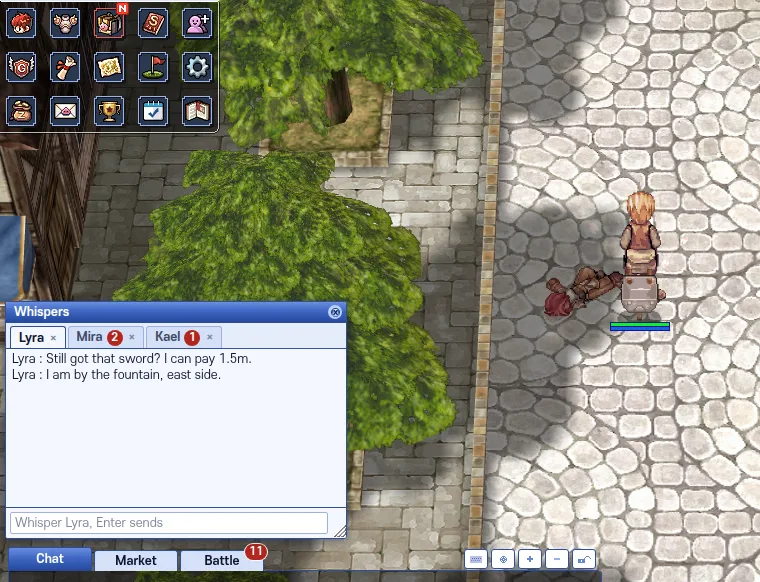
The whisper window after the update.
Changes
- Whispers now open in a light window just above the chat log, easy to read and clear of your menu icons.
The whisper window used to open as a dark see-through box over the menu icons in the top left, where the text was hard to read. It now opens on a solid light panel with dark text, just above the chat log and its tabs. If there is no room above the chat log, it opens beside it, and it moves with the chat log when you resize the browser. If you drag the window somewhere else, it stays there until you reload the page. Tabs, unread counts and Enter to send work as before. Checked at 1280x720, 1600x900 and 1920x1080.
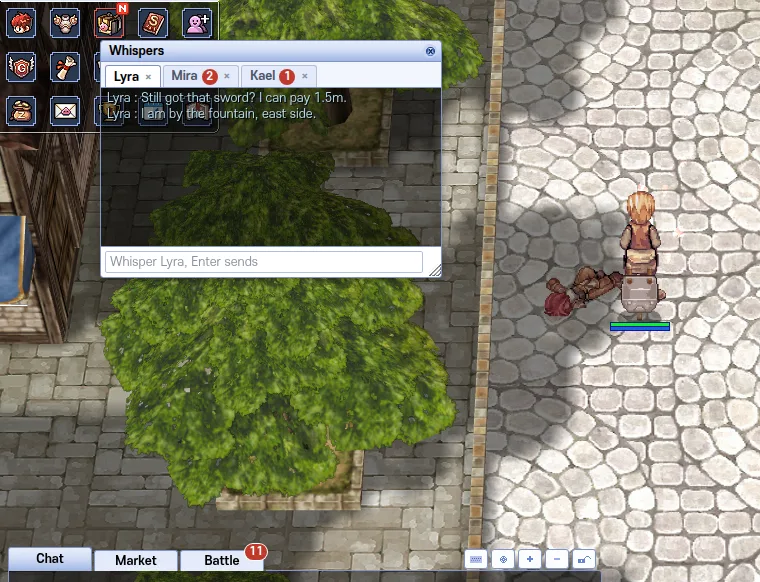
Before: over the menu icons. After: just above the chat log.
Fixes
- Trade window: long item names keep their card slot count, like [2]. Party window: map names fit (hover for the full name).
In the trade window a long name such as "+7 Double Bloody Two-Handed Sword[2]" was cut at the end, so the [2] was lost. The name is now cut before the slot count, which always shows, and the full name is still there when you hover the item. In the party window the map line ran out of its box; it now shows the map name before the comma, such as (Prontera), and the full line shows when you hover the member.
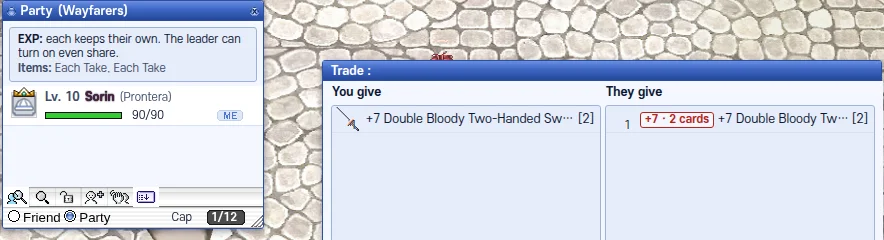
Trade keeps [2]; party shows (Prontera).