
Game update
Refine and enchant grade windows show what a fail does
How to get it
- Press Ctrl+F5 on the game page (Mac: Cmd+Shift+R) to get the update. Logging out and back in is not enough.
The game page keeps the client it loaded when you opened it. Ctrl+F5 loads the page fresh, with the new refine and enchant grade windows. Logging out and back in, or picking another character, keeps the page you already have.
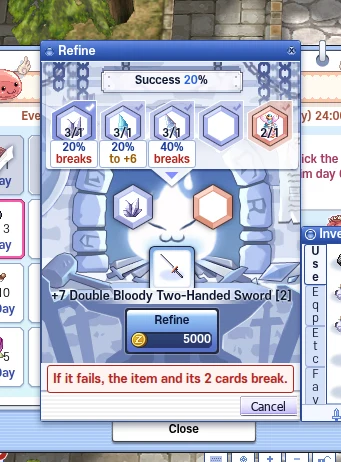
The refine window after the update.
Changes
- New game window look, part 3: the refine window now has the same bold look as the other windows, and the enchant grade window keeps its own art with bigger, clearer text.
The refine window gets the blue title bar and frame of the other bold windows. The enchant grade window keeps its glass tank and START button, and its text is now at least 11 px instead of 8.5 px. Checked at 1280x720, 1600x900 and 1920x1080.
Refine in the bold look. 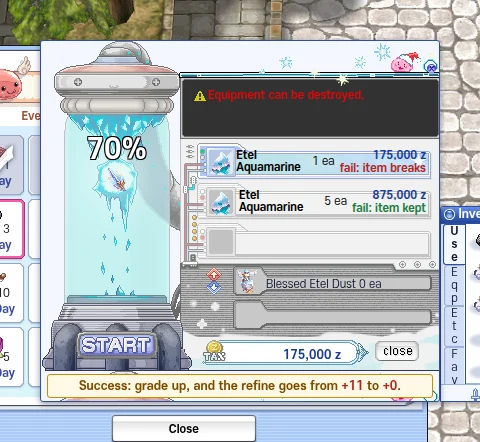
Enchant grade keeps its art. - Refine: under each ore you see its chance and what a fail does to your item (it breaks, or its refine drops), and the ore you pick adds one red line for your item, such as "If it fails, the item and its 2 cards break."
Each ore slot shows its success chance and what happens on a fail for the item in the window: "breaks", or "to +6" when the ore only drops the refine by one. Pick an ore and one red line says what a fail does to your item, with its cards, for example "If it fails, the item and its 2 cards break." for a +7 two-handed sword with 2 cards and Oridecon.
A +7 sword with 2 cards: what each ore does on a fail. - Enchant grade: each jewel option shows its fee and what a fail does (the item breaks, or it is kept), and the window tells you that a success sets the refine back to +0.
Each jewel option shows its fee and what a fail does: with 1 jewel a fail breaks the item, with 5 jewels the item is kept. Under the window one line tells you that a success raises the grade and puts the refine back to +0, for example "from +11 to +0".
The fee and the fail result on each option.
Fixes
- Fixed: the enchant grade window opened empty.
The enchant grade window drew nothing at all: its frame had no height, so the whole window was cut away. It shows again, with the chance, the jewel options and the START button.
The enchant grade window shows again.