Game update
Chat: block whispers, hide public chat, official chat lines
New
- Block whispers like on the official servers: /ex Name stops whispers from that player, /in Name lets them through again, /ex alone lists who you blocked, /exall blocks every whisper and /inall lets them all through.
The chat answers each command, for example "Whispering Blocked." and "Whispering accepted."
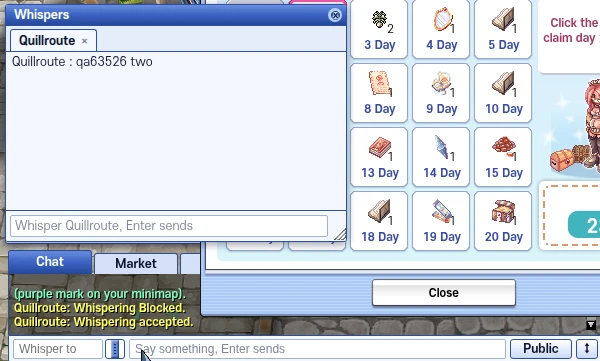
/ex and /in answer in the chat; only the whisper sent after /in arrived. - /nm hides public chat in the chat window and /nm2 hides public and guild chat. Type it again to show them. Chat bubbles over heads still show.
/nm and /nm2 say in the chat whether the filter is on or off.
The chat window, where these lines show.
Fixes
- The chat window prints the official lines: "You dropped [item] (n)." when you drop an item, the kill count of a quest as "[quest] quest - defeating [monster] progress (n/m).", and "[quest] quest was deleted." when a quest leaves your quest list, finished or dropped.
The drop line shows under the Item chat filter, the quest deleted line under Quest.
The chat window, where these lines show. - When a party member on your map picks up a weapon, armour or card, your chat shows "[name] has acquired [item]." under the Party item chat filter.
Only weapons, armour and cards show, and only for party members on the same map.
The chat window, where these lines show. - The "put on" and "taken off" lines follow the Equipment on/off chat filter.
A chat tab with only Equipment on/off ticked now shows them; before, they showed under Item.
The chat window, where these lines show. - The chat padlock prints a line when you lock or unlock it.
The lines are "Activate lock function" and "Deactivate lock function", like the official client.
The chat window, where these lines show. - Press Ctrl+F5 on the game page (Mac: Cmd+Shift+R) to get the update. Logging out and back in is not enough.
Ctrl+F5 loads the new game files. Logging out keeps the old files your browser already has.