
Fixes
Browser client: quest window, window positions
The Quest Information window shows only the rewards a quest really gives, and windows remember where you put them, also after a reload.
Browser client
- Browser client: the Quest Information window shows only the rewards a quest really gives (Base EXP, Job EXP, items with their amount), and its description wraps instead of running off the right edge.
The Quest Information window in the browser client now shows only the actual rewards a quest gives, including Base EXP, Job EXP, and items with their amounts. The description text now wraps properly instead of running off the right edge of the window.
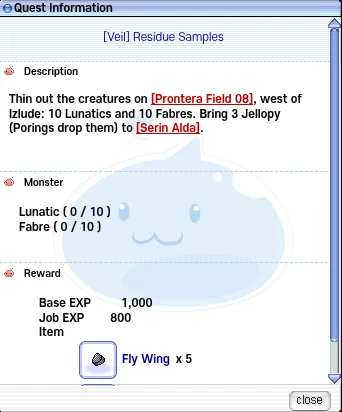
The Quest Information window: the description wraps inside the window and the Reward block lists Base EXP 1,000, Job EXP 800 and Fly Wing x 5 - Browser client: windows remember where you put them, also after a reload. By default the quest windows open on the right, the quest details next to the quest list, and the Navigation window on the left.
Browser client windows now remember their position after being moved, even after a reload. By default, quest windows open on the right, quest details appear next to the quest list, and the Navigation window opens on the left.